
An account manager opens a renewal call in a good mood. The relationship is healthy, usage is up, and there is an expansion on the table worth more than the base renewal. A term sheet goes out that afternoon. The next morning, finance blocks the order, because the same customer has an invoice more than 45 days overdue and is already on credit hold in the accounting system. Nobody on the call knew.
The cost is not the delay. It is that the company has now offered better terms to a customer finance had decided to stop shipping to, and the renewal owner has to reopen a “won” deal with an awkward conversation about money that should have come first. The gap behind it is simple: the people who own the renewal work in the CRM, the people who own the receivable work in the ERP, and neither number crosses over on its own. Aonflow closes that gap by surfacing two finance signals, the customer balance and the credit hold, on the Salesforce account, so the renewal conversation starts with both.
This is for whoever owns the renewal number and the money behind it: RevOps and account leads, controllers, and the IT head who connected Salesforce and the finance system.
What this post resolves:
- Balance and credit hold are two different signals, and you need both, not one.
- The balance is a moving number, computed from unpaid entries, not a value you copy once.
- The credit hold is a gate with distinct settings (Ship, Invoice, or All) that mean different things for the deal.
- Both belong on the Salesforce account, read-only, so the renewal owner reads them and finance still owns them.
- A late payment lands in an accounting period, and you need the cutoff rule when a sync or a payment slips over month end.
When the Renewal Conversation Starts Too Late
The renewal conversation does not start when the account manager dials. It starts weeks earlier, when finance changes the customer’s status because a payment did not arrive. By the time the renewal owner shows up, a decision has already been made on a screen they never see.
That is the operational pain. The renewal team and the finance team look at the same customer through two windows that do not connect. The CRM shows relationship health, usage, and opportunity value. The finance system shows an overdue balance and a hold. Both are true, but only one is in front of the person about to make a promise. And a promise made to a customer on credit hold is worse than no promise, because it commits the company to terms finance has already rejected and forces a retraction that teaches the customer the left hand does not know what the right is doing.
Balance Is a Number, a Hold Is a Gate
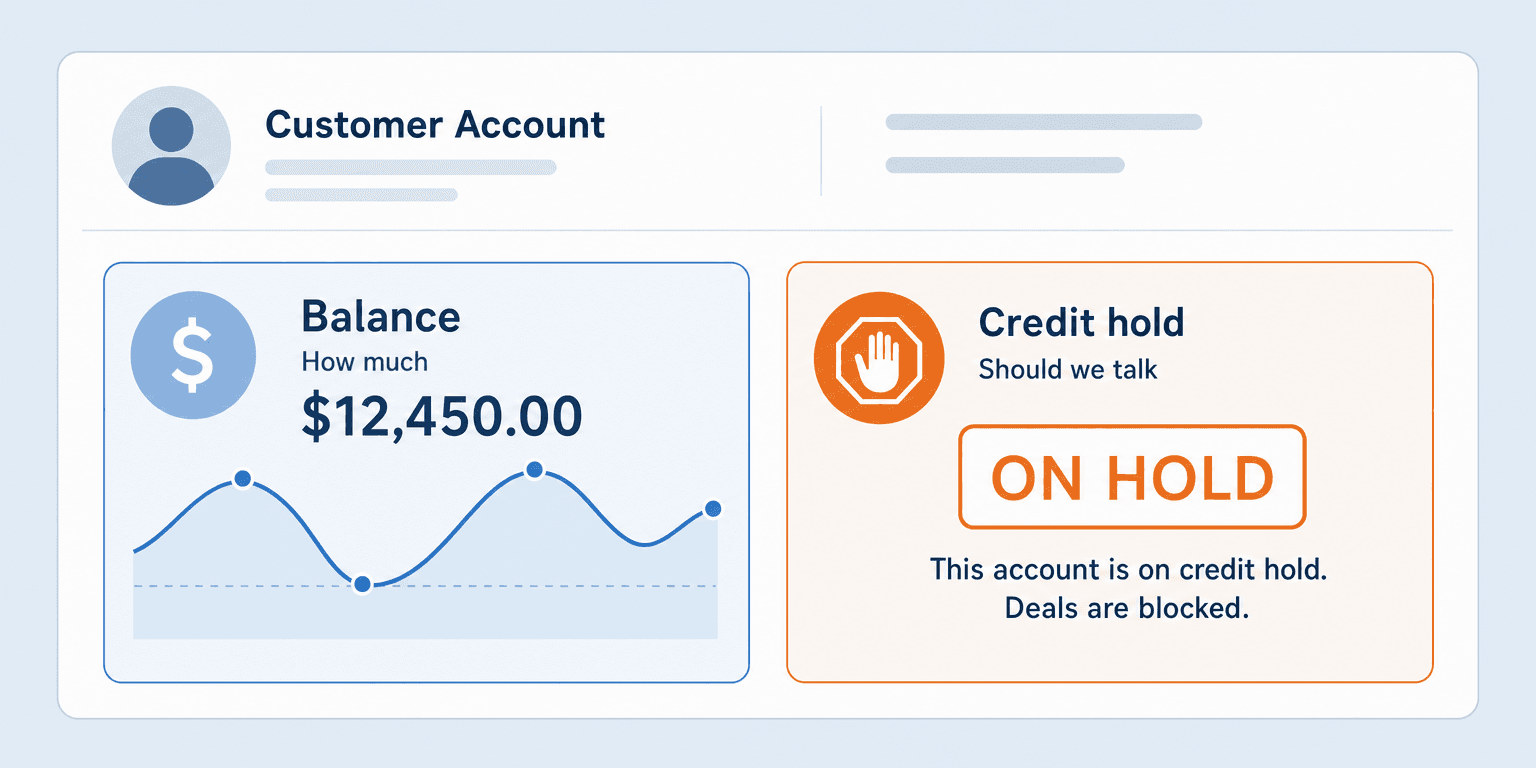
It is tempting to treat this as one problem: “get the finance data into the CRM.” But balance and credit hold behave differently, and merging them hides the more important one.
The balance is a quantity. It goes up when an invoice posts and down when a payment lands, and it answers “how much.” The credit hold is a decision a person or a rule made: this account is stopped until the money moves, and it answers “should we be talking at all.” A renewal owner who sees a high balance might reasonably still push the deal and sort out payment later. A renewal owner who sees a hold knows the deal cannot ship until the hold clears, whatever the balance says.
The Rule: The balance is data; the credit hold is a decision. Sync the number if you want, but never let a renewal open without the decision on the screen.
Most integrations copy the balance and stop, because a number is easy to move. The hold is the harder field, and the more valuable one.
Why the Balance Keeps Moving
The balance is not a field you copy once and forget. In Business Central, the customer balance is calculated from every posted, unpaid entry on the account, so it changes throughout the day. A new invoice raises it, a received payment lowers it, a credit memo adjusts it.
That matters for a renewal, because a balance a day old can be wrong in the direction that hurts. A customer who paid this morning still looks delinquent on a stale copy. A customer who just triggered a large invoice still looks clean. For example, a payment received at 9 a.m. lowers the balance immediately in Business Central, while a CRM copied from last night still shows the pre-payment figure.
So the balance has to be kept in sync in near real-time, not copied on a nightly batch, and it has to be read-only, because the CRM displays the balance rather than deciding it. Finance owns it. Salesforce shows it.
The Credit Hold Is a Gate, With Settings
The credit hold is not a single on/off flag. In Business Central, the customer card carries a Blocked field that stops different activities depending on how it is set, and a credit limit that warns when a new order would push the balance past an agreed ceiling.
The settings are not interchangeable, and the renewal owner needs to know which one is on:
| Blocked setting | What it stops | What it means for the renewal |
|---|---|---|
| Ship | New orders and shipments | Existing shipments can still be invoiced, but no new order goes out until it clears |
| Invoice | New orders, shipments, and invoices | Most new business is stopped |
| All | Every transaction, including payments | Account is fully halted |
| Blank | Nothing | No block, though a credit limit may still apply |
A renewal owner who sees “Blocked: All” knows the expansion is dead until finance clears it. One who sees a credit limit nearly reached knows the expansion itself might trip the block. Neither is visible from a balance alone, which is exactly why the setting, not just the fact of a block, has to travel to the CRM.
How Aonflow Surfaces Balance and Credit Hold in Salesforce
Aonflow connects Business Central and Salesforce with pre-built, no-code connectors and keeps the fields aligned in near real-time. The renewal owner reads the balance and the hold on the account they already work in, while finance keeps ownership of both. Each field lands read-only and drives a specific decision.
| Business Central field | Salesforce account field | The decision it drives |
|---|---|---|
| Balance (LCY) | Customer balance (read-only) | How hard to push payment before the renewal |
| Credit Limit (LCY) | Credit limit (read-only) | Whether the expansion itself trips the limit |
| Blocked | Credit hold status (read-only) | Whether the deal can ship at all |
Aonflow lets teams:
- Surface the moving balance onto the Salesforce account in near real-time, so the number in front of the renewal owner is the one finance sees, not last night’s.
- Carry the specific hold setting (Ship, Invoice, or All) as a read-only status, so the blocked customer from the opening scene is visible before a term sheet goes out.
- Map the fields without code, using AI-assisted mapping that reduces integration setup time by more than half, so the balance, limit, and Blocked fields land in the right Salesforce fields.
- Recover a broken flow on its own, using self-healing flows, so a hold does not silently stop updating.
- Monitor every sync with dashboards and alerts, so someone knows when the balance or hold stops refreshing.
Which Period a Late Payment Lands In
Because this touches accounts receivable, timing is an accounting question, not just a performance one. When a customer pays late, the payment lands in the accounting period it posts in, not the period the invoice belonged to. A payment that arrives on the 2nd settles a prior-month invoice but posts in the new month.
That matters twice over. First, a balance the renewal owner reads on the 1st may clear on the 2nd, so a hold that looked permanent one day is gone the next. Second, if the sync flow is down over month end, the catch-up rule has to be explicit: when the flow resumes, it replays entries in posting order so the balance and any period-boundary movement reconcile, rather than arriving as one lump that misstates which period a payment belonged to. The renewal owner does not run the close. They just need the balance on the account to reflect the same period the controller sees.
A Worked Example: The Expansion Nobody Could Ship
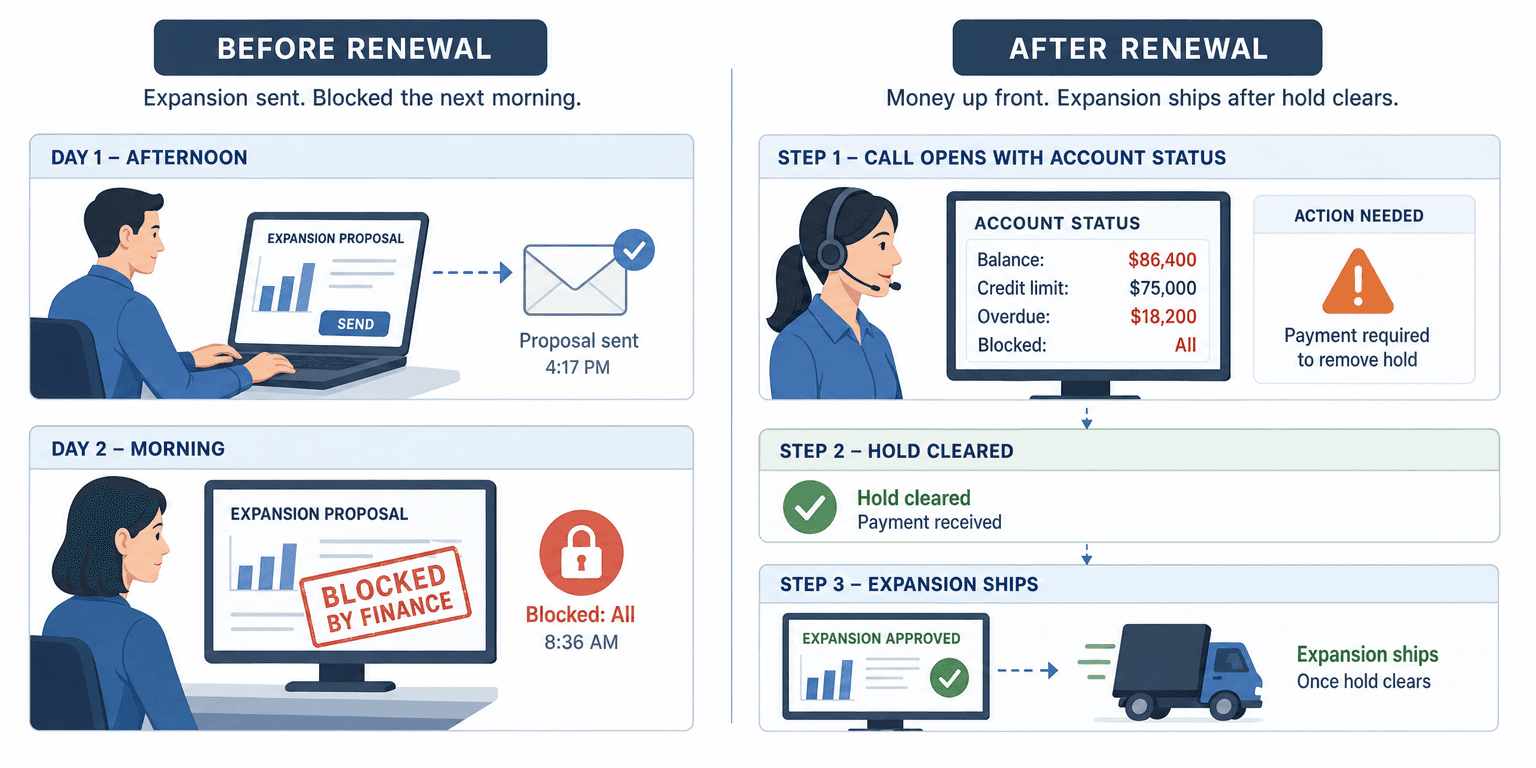
A customer is up for renewal at $95,000, with a $120,000 expansion on the table. In Salesforce, the opportunity looks strong. In Business Central, the same customer carries a balance of $86,400 against a credit limit of $75,000, with one invoice of $18,200 sitting 47 days overdue, and the Blocked field set to All.
Without the sync, the account manager sends the expansion term sheet, and finance blocks the resulting order the next morning. The deal reopens, the customer is confused, and the number goes back to zero.
With the balance and hold on the account, the same call opens differently. The account manager sees “Balance: $86,400,” “Credit limit: $75,000,” and “Blocked: All” before dialing. The conversation starts with the overdue invoice, not the expansion. The customer clears the $18,200, the hold lifts, and the expansion goes out to an account that can actually receive it. Same deal, different order of operations, and the order of operations was the whole game.
Who Owns This When It Breaks
Who owns the flow? The IT head or integration owner who connected Business Central and Salesforce owns the sync itself. Finance owns the balance and the hold as data, because those are set in the accounting system and only displayed in the CRM.
Who gets alerted when it fails? The flow owner is paged when the balance or hold sync fails twice in a row. Finance is notified when a hold change does not reach Salesforce within the expected window, because a stale hold is the one that causes a bad promise.
Where do failed records wait for review? A customer record whose balance or hold cannot be updated waits in an error queue, with its last-known values flagged as stale, so the renewal owner sees a “last updated” marker rather than a confidently wrong number.
Escalation triggers:
| Trigger | Who acts |
|---|---|
| No balance refresh for a customer beyond the agreed window | Flow owner |
| A hold change in Business Central not reflected in Salesforce within the sync window | Finance |
| Repeated sync failure on the same account | IT head |
Access here is governed by role-based access control, the sync runs over HTTPS, and the finance fields reach Salesforce through read-only token access, so the CRM never writes back to the ledger.
FAQ
Does surfacing the balance in Salesforce let reps change it? No. The balance and the hold are read-only on the account. They are displayed, not edited, and the finance system stays the single source of truth.
Is near real-time fast enough for a credit hold? For a renewal conversation, yes. The hold has to be current as of the last sync, and near real-time keeps it within a short window. What you avoid is the nightly batch, where a hold set at 9 a.m. is invisible until the next morning.
Do I still need my finance system’s credit controls? Yes. Aonflow does not replace the credit management in Business Central. It surfaces the result of that management, the balance and the hold, where the renewal happens. The decision stays in finance.
What if the customer pays right before the call? With near real-time sync, the balance drops and the hold clears on the account shortly after the payment posts, so the renewal owner sees the current position rather than yesterday’s.
Conclusion
Two signals decide whether a renewal conversation should open the way you planned: how much the customer owes, and whether finance has already stopped the account. The balance is a moving number, the credit hold is a decision, and the renewal owner needs both in front of them before the call, read-only and current. Get that right and the awkward second conversation never happens, because the first one started in the right place.
Before your next renewal cycle, pull one blocked customer and check how long it took the renewal team to find out. That number is the size of the gap.
Get Started with Aonflow iPaaS – Free Trial Available!
Build and deploy your integrations at zero cost. No credit card required!