
The deal is approved on a Thursday. The customer card appears in Business Central a few minutes later, and everyone moves on. Five weeks later, the new customer’s operations director gets a payment reminder for an invoice she never knew existed. It went to her because she was the only contact on the deal. It was due in 30 days because that is what the template said. The rep had agreed to 45.
That reminder is the first thing your finance team ever says to the customer. It asks the person who championed the purchase for money the contract says is not due yet. The rep then spends the next call apologizing, and the aging report shows a five-week-old customer as overdue. Nothing broke. The card was simply created before anyone knew what belonged on it, because the team treated approval as the start of onboarding. It should be the deadline.
Aonflow has pre-built connectors for Salesforce and Business Central, so new customer onboarding runs as a configured flow, in near real-time, once a deal is approved. Speed is the easy part. The decisions below are the hard part, and they hold on any integration platform. This is for whoever owns the first invoice: finance and operations leads, controllers, and sales operations.
Five decisions make the new customer card ready to bill:
- The approval signal: which Salesforce event counts as “approved” for finance.
- The onboarding packet: the fields sales collects before a deal can be approved.
- The completeness check: what the flow does when a field is missing.
- Sales-owned and finance-owned fields: who collects each field, and who decides it.
- Period cutoff: which month the first invoice lands in when onboarding runs late.
What Does a Half-Onboarded Customer Cost?
A half-finished customer card does not look broken. It has a name, an address and a customer number. What it lacks are the fields that matter only once the first invoice goes out: who receives it, when it is due, and whether you charge sales tax.
So the cost arrives late, and in front of the customer. The invoice reaches the wrong person. The due date is wrong, so collections chases a customer who is not late. A tax-exempt buyer gets charged sales tax, and finance issues a credit memo in week three.
The customer flow has one job: it admits a company to billing. A company admitted with half its details is a problem every later flow inherits.
The Approval Signal: When “Approved” Means Finance Can Bill
The flow needs one event it can trust, and that event has to mean “the commercial terms are final.” Closed Won works if your team never edits a deal after it closes. A formal approval works better if large or discounted deals need sign-off first.
If you run a Salesforce approval process, prefer it. When a record is submitted for approval, Salesforce locks it so other users can’t edit it while the approval runs (Salesforce Help). As a result, nobody can quietly change the terms while the approver is reading them.
The Onboarding Packet: What Sales Collects Before Approval
Most teams treat approval as the starting gun. Sales gets the yes, the integration creates the customer, and finance fills in the gaps. That order feels efficient, but it is the most expensive order available. Before approval, the rep has the customer’s attention and a reason to get answers fast. After approval, finance is asking a stranger for information through someone who has stopped chasing.
The Rule: deal approval is the deadline for onboarding data, not the start of collecting it. If the customer card can’t be completed from the approved deal, the deal isn’t approved yet.
In plain terms, the opportunity knows what was sold, and the customer card has to know how to bill it. The packet is the short list that bridges the two:
| Packet field | Why finance needs it | Where it lands in Business Central |
|---|---|---|
| Legal name | The invoice prints it, and the customer’s payables team matches on it | Customer name |
| Billing contact email | Invoices go to the payer, not the champion | Customer email and sending method |
| Agreed payment terms | Sets the due date on every invoice | Payment terms on the customer card |
| Tax status | Decides whether you charge sales tax, with the exemption certificate if not | Tax setup on the customer card |
| Billing address | Where invoices and statements go | Customer address |
It is tempting to copy the opportunity’s primary contact into the billing email. Don’t. The primary contact wanted to buy. The billing contact has to pay. Likewise, the email on the card works together with the card’s sending method, which Business Central calls a document sending profile (Microsoft Learn).
Enforce the packet where the rep works, not in the integration. Salesforce validation rules check that data meets the standards you set before a user can save a record (Salesforce Help). A rule that refuses to save a deal marked ready for approval without a billing email catches the gap while the rep still has the customer on the phone.
The Completeness Check: What Happens When a Field Is Missing
Validation rules are the first line, not the only one. Rules get edited, and some records arrive by paths that skip them. So the flow checks every packet field again before it creates anything, and it takes exactly one of three paths.
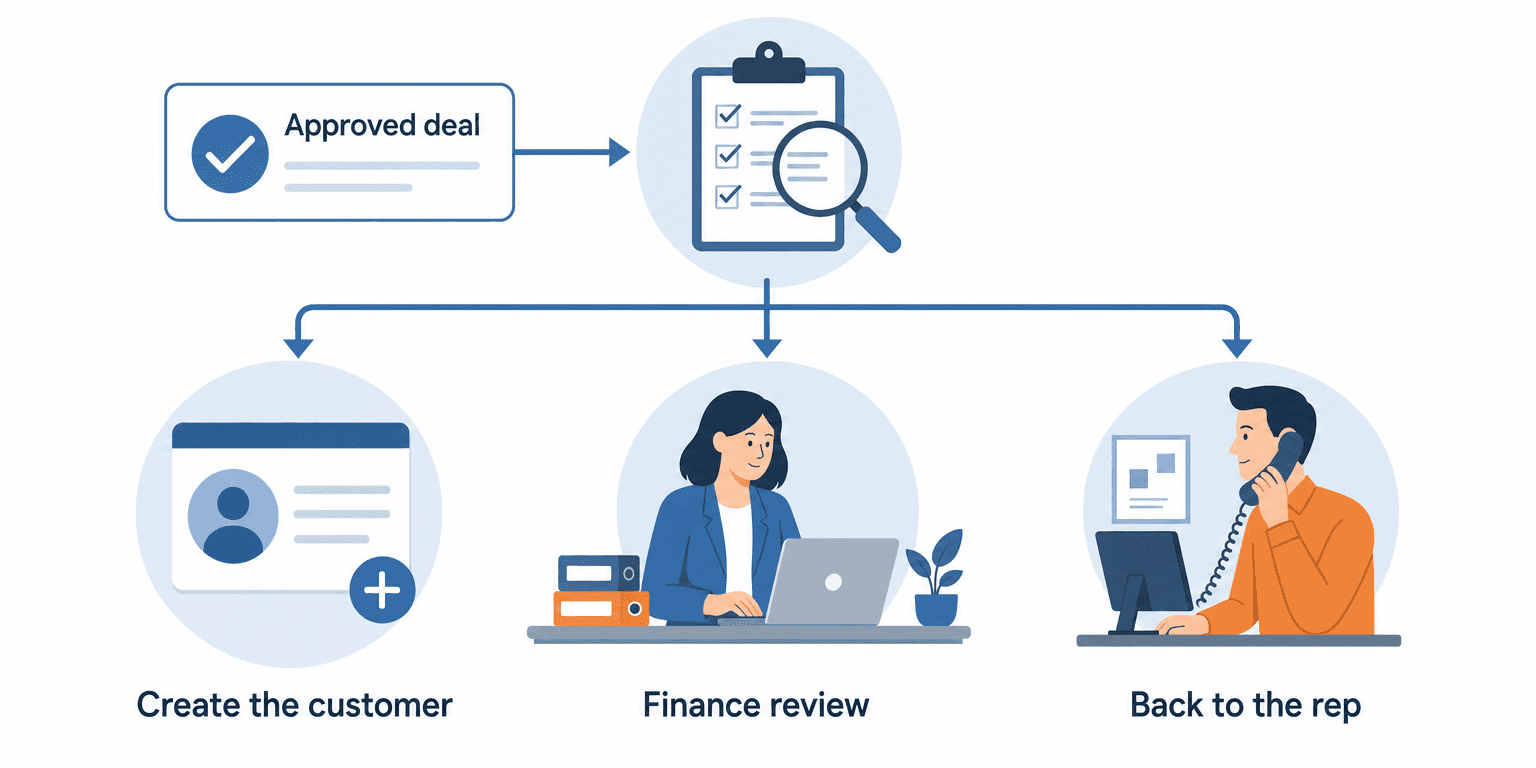
| What the flow finds | What it does |
|---|---|
| 1. Every field present, standard terms | Create the customer |
| 2. Every field present, non-standard terms or a tax exemption | Finance review, then create |
| 3. A sales-owned field missing | Back to the rep |
Teams get the third path wrong most often. A missing billing email is a sales question, so the alert goes to the rep, who can call the customer today. In a finance queue, the same question takes three emails and a week.
Sales-Owned and Finance-Owned Fields
Some fields sales collects and finance simply accepts. Others sales can only propose. Sales owns what the customer tells you: legal name, billing contact, billing address and the terms they asked for. Finance owns what you decide about the customer: whether non-standard terms are acceptable, the credit limit, and whether an exemption certificate is valid.
The split matters more than it looks. Business Central applies the customer’s payment terms to every sales document you create for that customer. Changing the terms on a single document doesn’t change the default on the card (Microsoft Learn). A wrong value on the card is therefore not one wrong invoice. It is every invoice until someone fixes the card itself.
Agree one thing in writing before you build: what your standard payment terms are. Anything else is, by definition, a finance decision.
Period Cutoff: The Deal Approved on the Last Day of the Month
Onboarding delays turn into accounting questions at month end. Take a deal approved on Wednesday, September 30 at 5:15 pm with net 60 terms. Net 60 is non-standard, so it waits for finance review, and the card appears on Thursday, October 1.
Two details decide what happens next. First, Business Central calculates due dates from the document date, not the posting date (Microsoft Learn). So the invoice date moves the due date as well as the period. Second, finance controls which dates accept postings (Microsoft Learn).
Agree two rules with finance:
- The normal rule. The first invoice carries the billing start date the contract states, not the date the card appeared.
- The catch-up rule. After a hold or an outage over month end, held invoices wait. Finance dates each one by hand, rather than letting it post into whichever period happens to be open.
How Aonflow Runs New Customer Onboarding From Salesforce to Business Central
Aonflow lets teams:
- Start the flow on the approval signal you chose, through the pre-built Salesforce and Business Central connectors, in near real-time.
- Build the three paths of the completeness check as no-code flow steps, so the finance review and the rep hold are visible, not tribal knowledge.
- Map the agreed terms and billing contact with AI-assisted mapping, which reduces integration time by more than half, so the agreed net 45 lands in the card’s payment terms.
- Alert the rep in Slack or Microsoft Teams when a sales-owned field is missing, using Aonflow’s connectors for both.
- Recover failed creation calls with self-healing flows, so a dropped connection doesn’t leave an approved deal without a customer.
Aonflow does not replace either system. The deal and its approval stay in Salesforce, and the customer stays in Business Central.
A Worked Example: Net 45 Agreed, Net 30 Invoiced
A 60-person software services firm runs sales in Salesforce and finance in Business Central.
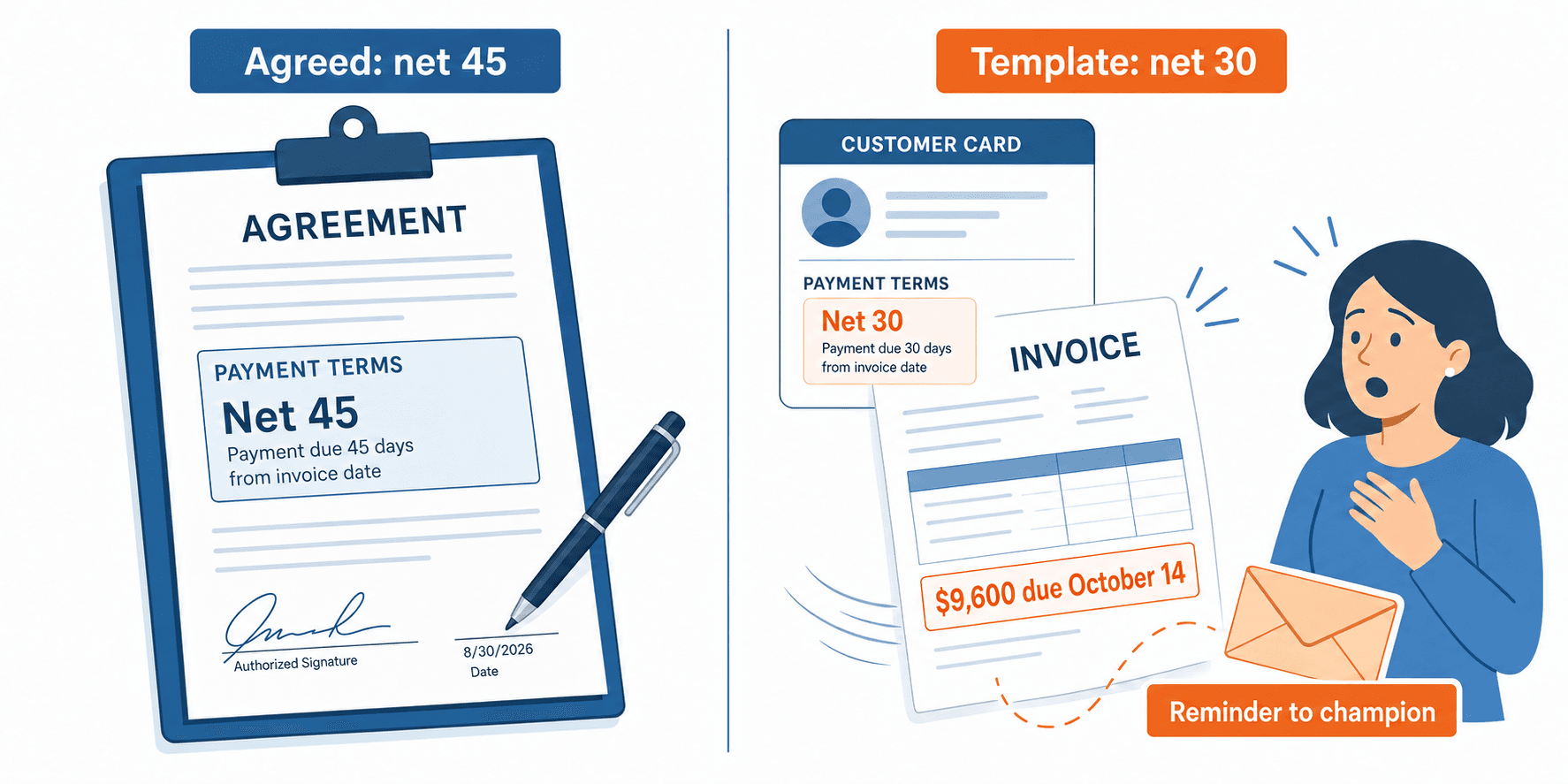
- Thursday, September 10. A $38,400 annual contract, billed quarterly, is approved. The rep agreed net 45. The approval carried neither the terms nor a billing email, so the flow created the card from the template with net 30 and the champion’s email.
- Monday, September 14. The first invoice of $9,600 posts, due October 14 instead of October 29.
- Thursday, October 15. The invoice shows overdue, and a reminder goes to the champion.
- Wednesday, October 21. Finance corrects the due date on that one invoice. The card still says net 30, so the December invoice would repeat the mistake until someone fixes the card.
The fix took two validation rules and one flow branch: billing email and payment terms required at approval, and any terms other than net 30 routed to finance review before creation.
Who Owns This When It Breaks
Who owns the flow? The accounts receivable lead owns customer creation, because finance lives with the first invoice. Sales operations owns the packet and the validation rules in Salesforce.
Who gets alerted when it fails? The rep, on a missing sales-owned field. The accounts receivable lead, on anything waiting for a finance decision. The IT head, on a connection or credential failure that survives a self-healing retry.
Where do failed records wait for review? In an onboarding review queue, not a log file. Each held deal shows the missing or disputed field, the reason it stopped, and the billing start date, so finance can see which holds are about to cost money.
Escalation triggers:
| Trigger | Who acts | Within |
|---|---|---|
| A sales-owned field still missing after the rep alert | Sales operations | 1 business day |
| A finance review still open close to the first invoice date | Controller | 2 business days before that date |
| A connection failure that survives a retry | IT head | 1 hour |
Role-based access control governs who can change the flow, audit trails record what changed, and data moves over HTTPS. Those controls help once the three questions above have names against them.
FAQ
What if the customer already exists in Business Central?
The flow links to the existing card instead of creating a second one. Run that match before the completeness check, so a returning customer never gets a fresh card.
Do we need a developer to enforce the packet in Salesforce?
Usually not. Validation rules are point-and-click formulas a Salesforce admin sets up. You do need someone who knows your billing setup to say which fields are required.
Should the customer be created at approval or at the first order?
At approval, so the order never waits for a customer. Our guide to turning a closed-won opportunity into a sales order covers the order side of the handoff.
Does this replace our credit check?
No. The flow carries the request to finance, and finance still sets the credit limit.
Conclusion
A customer card that exists is not a customer you can bill. Five decisions close that gap: the approval signal, the onboarding packet, the completeness check, sales-owned and finance-owned fields, and period cutoff. Settle them before the first sync, and the first thing finance sends a new customer is a correct invoice.
Before your next approval, pull your last ten new customer cards and list every field someone added after creation. That list is your onboarding packet.
Get Started with Aonflow iPaaS – Free Trial Available!
Build and deploy your integrations at zero cost. No credit card required!